Introduction
mitmproxy lets you intercept http (including http over tls, websocket) packets, and it has a web interface (mitmweb) to easily view the details of each packets in the browser.
tampermonkey lets you tamper the web pages.
Together, we can implement a better llm viewer: we intercept llm api calls, and view it in a nice and customizable format in the browser.
What you’ll get
With mitmproxy and Tampermonkey working together, you’ll be able to:
- Intercept and analyze LLM API calls in real-time
- View complex JSON responses in a formatted, readable way
- Customize the viewing experience with your own Tampermonkey scripts
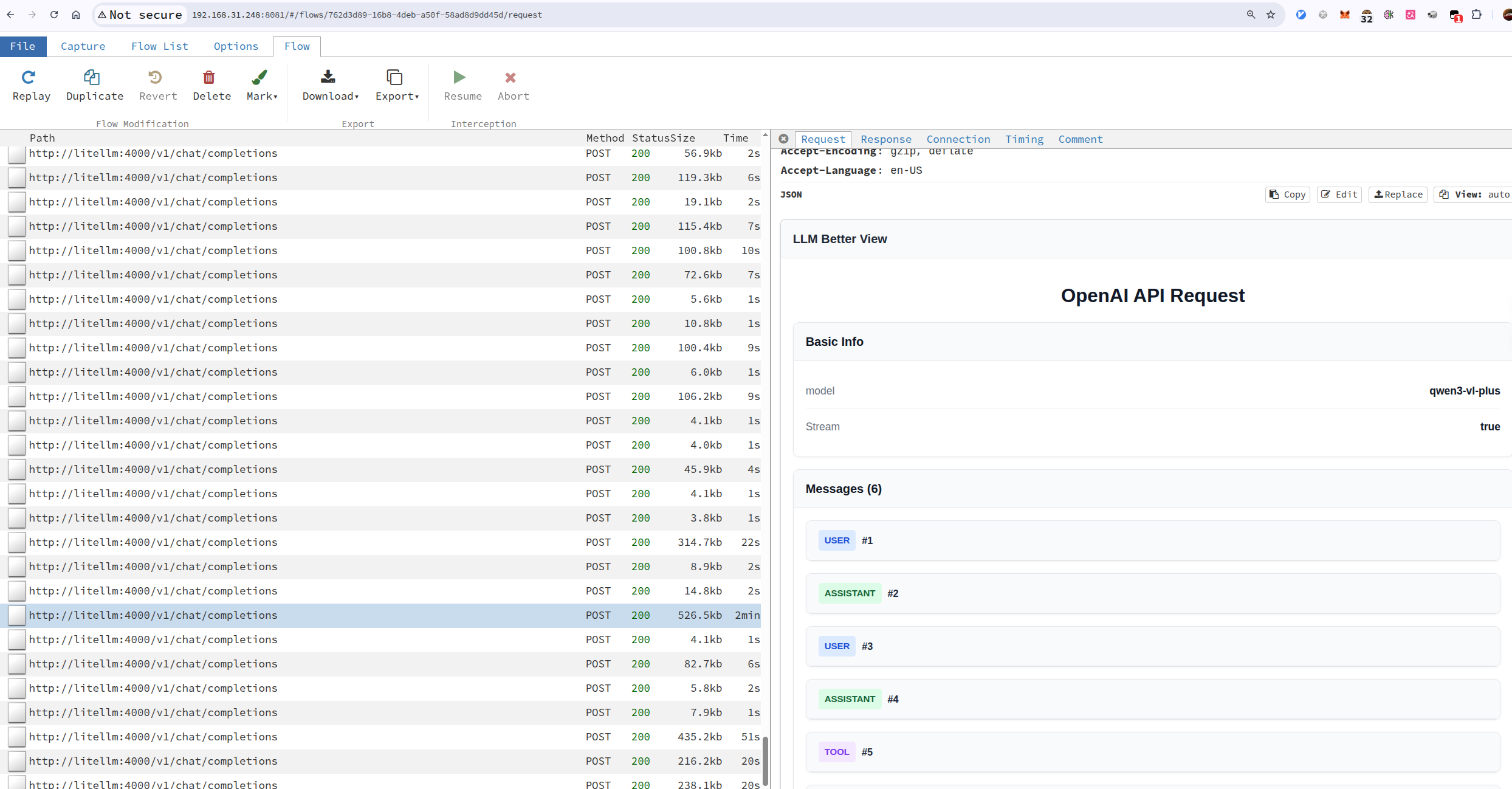
Figure 1: LLM Better View Example
Capture llm api calls
There are multiple ways to capture LLM API calls using MITM (Man-in-the-Middle) tools like mitmproxy, depending on how you can configure your environment:
Reverse Proxy Mode (Recommended for applications with configurable API endpoints)
- Best suited when you can set the API base URL in your application
- The application connects directly to your MITM proxy, which forwards requests to the actual LLM service
- Example: Configure your LLM client to use `http://localhost:8081` as the base URL, then run:
1mitmweb --web-host 0.0.0.0 --web-port 8081 --no-web-open-browser --mode reverse:https://api.openai.com@443 --showhost --set web_password='sky'Forward Proxy Mode (For browser-based LLM interfaces or when you can configure system proxy)
- Configure your browser or system to use the MITM proxy as a forward proxy
- All HTTP/HTTPS traffic goes through the proxy
- Example:
1mitmweb --web-host 0.0.0.0 --web-port 8081 --no-web-open-browser --mode regular --showhost --set web_password='sky'- Then configure your browser/system to use `localhost:8081` as HTTP/HTTPS proxy
Transparent Proxy Mode (For network-level interception)
- Requires routing traffic through the MITM proxy at the network level
- Uses iptables rules to redirect traffic without client configuration
- Requires root privileges and network configuration
- Example setup:
1
2
3
4
5
6
7
8
# Enable IP forwarding sudo sysctl -w net.ipv4.ip_forward=1 # Redirect port 443 to mitmproxy (running on port 8080) sudo iptables -t nat -A PREROUTING -p tcp --dport 443 -j REDIRECT --to-port 8080 # Start mitmproxy in transparent mode mitmdump --mode transparent --showhost --set web_port=8081 --set web_host=0.0.0.0
The reverse proxy approach is often the most practical for LLM development environments since many LLM SDKs and clients allow you to override the API base URL (e.g., OpenAI’s `base_url` parameter, Anthropic’s `base_url`, etc.), making it easy to route traffic through your MITM proxy without complex network configuration.
Install tampermonkey better-llm-view script
I already have a tampermonkey script, you can install it directly or develop upon it.
- make sure you have tampermonkey extension installed in your browser (make sure allow user scripts option is enabled)
- install the tampermonkey script by opening mitmweb-llm-better-view.user.js
- adjust the include rule of the script to match the mitmweb’s
--web-hostand--web-port - the script will transform the raw JSON responses into a more readable chat-like interface
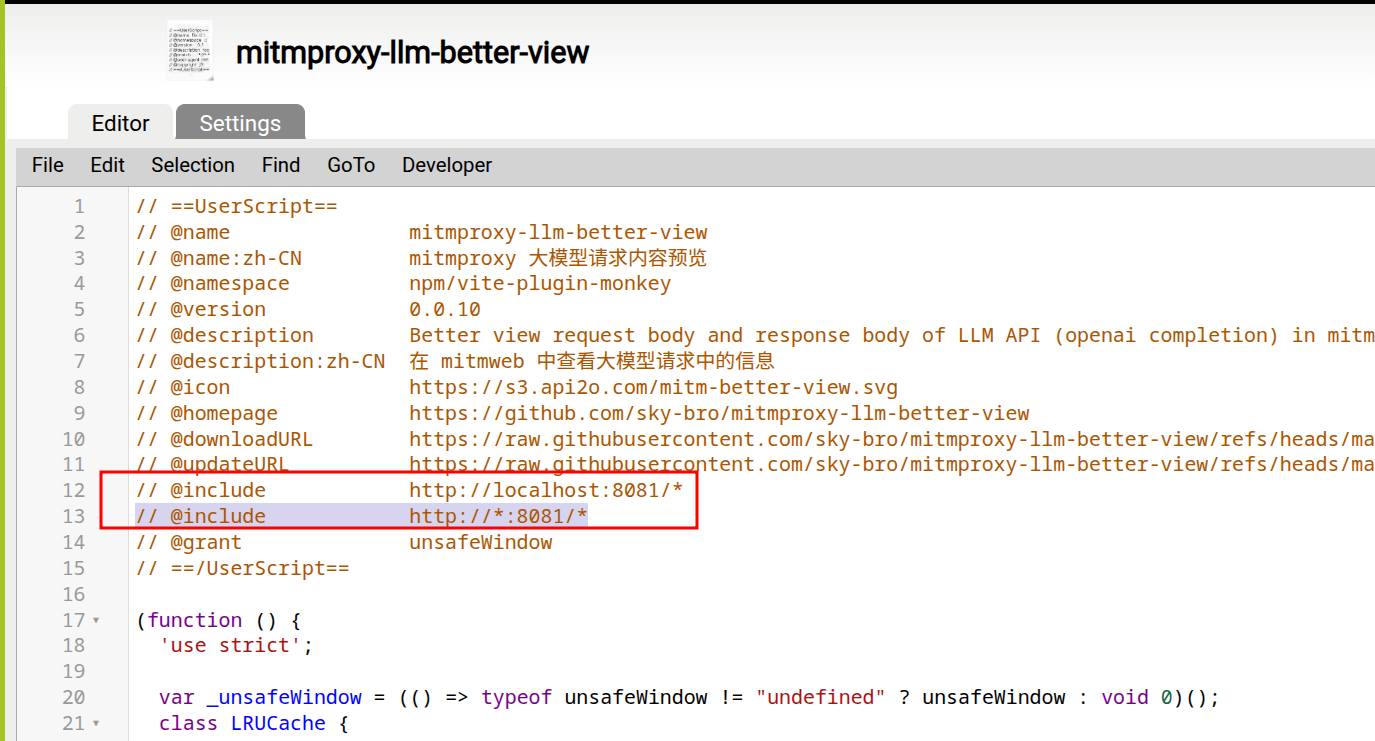
Figure 2: set script include rule
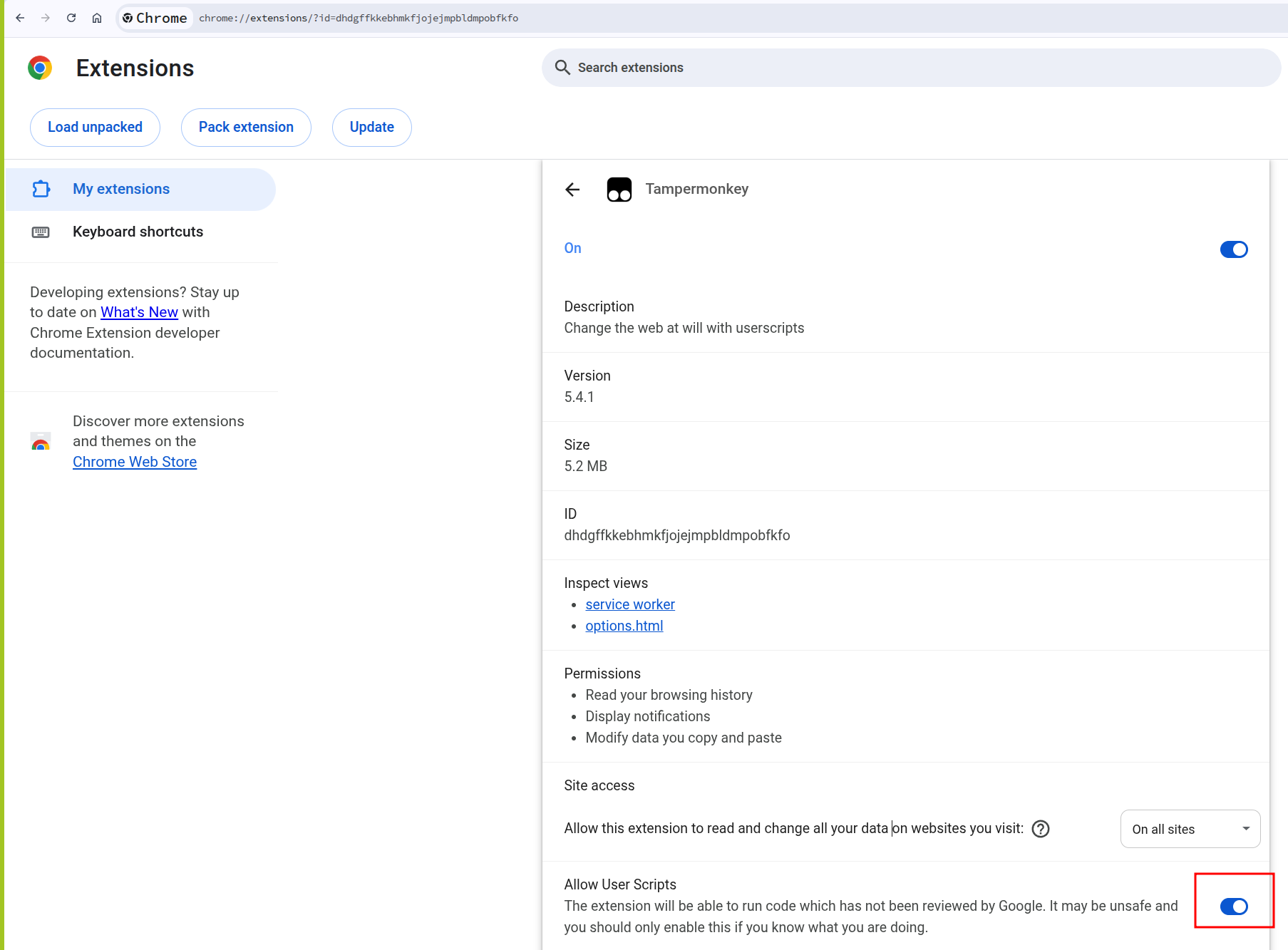
Figure 3: allow user scripts for tampermonkey
(advanced) create an addon to clean up history captures
Clear capture history with mitm addon
You can create custom Python addons to process and filter captured traffic automatically. For example, you can write an addon that:
- Filters out non-LLM related traffic
- Automatically formats specific API responses
- Cleans up old captures based on custom criteria
- Logs specific data to external files
Conclusion
Combining mitmproxy with Tampermonkey creates a powerful tool for analyzing LLM API traffic. This setup allows you to:
- Debug API calls and responses
- Understand how LLM interfaces structure their requests
- Extract and analyze conversation data
- Build custom visualization tools for your specific needs
This approach works with any LLM service that communicates over HTTP/HTTPS, making it a versatile tool for anyone working with or analyzing LLM APIs.